Windows 11’s modernization broke a 26-year-old scroll trick that even Electron apps still have, and a Microsoft veteran only just learned it
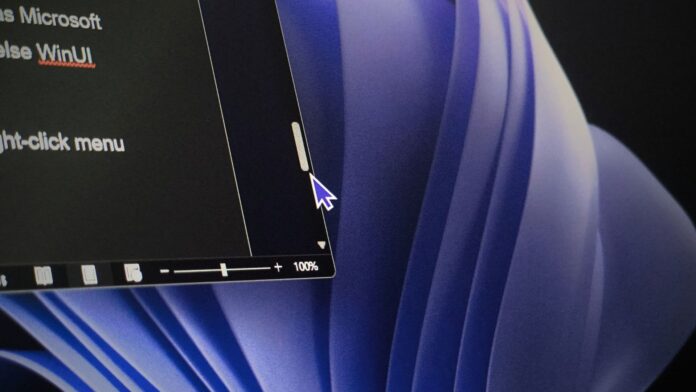 Windows 11’s WinUI is missing Scroll Here function
 Windows has had a lesser-known scrollbar shortcut since Windows 2000, where holding Shift and clicking the scrollbar jumps directly to that spot. Microsoft’s Raymond Chen, who is the unofficial historian of Windows, only learned about it recently, and he found that Electron apps support it, but WinUI, the framework of modern Windows 11 apps, does not.
Like me, if you have to frequently research 300-page PDFs and use a tiny scrollbar thumb to do so, you’ll appreciate this shortcut. Instead of clicking through the gutter page by page, or giving your finger some workout with the mouse scroll wheel, you can hold Shift, click where you want to go, and the scrollbar jumps there.
https://www.windowslatest.com/wp-content/uploads/2026/10/Shift-and-Click-the-Scrollbar-to-scroll-here.mp4I regret not knowing this sooner, but that’s okay, because Chen, who has been working on Windows for over 30 years, didn’t know about it until recently!
Anyway, when he checked which apps support it, Electron was on the list, but surprisingly, Microsoft’s WinUI isn’t.
Windows scroll bars have seven right-click shortcuts, including a hidden Shift trick
For the first two decades of Windows, the scroll bar had five mouse targets. The arrows at each end scroll by a line, the gutters on either side of the thumb scroll by a page, and you drag the thumb to go anywhere else.
Windows 2000 added a right-click menu to the scroll bar with seven options. Four match existing mouse clicks and two match keyboard shortcuts.
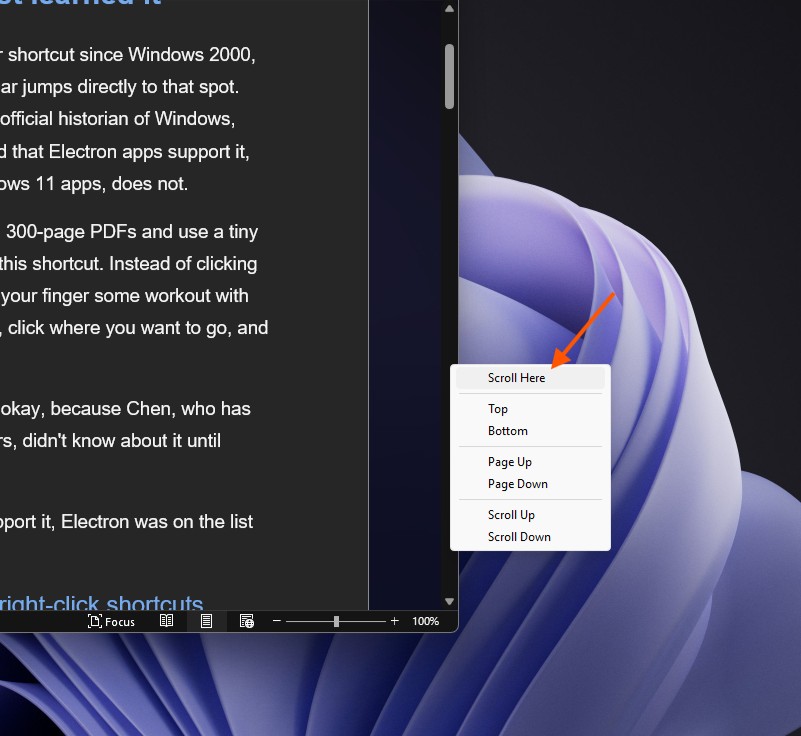 Scroll Here in Context Menu in Microsoft Word. Credit: Windows Latest
The seventh, “Scroll Here” was new: right-click the spot you want and you jump directly there, without dragging the thumb all the way.
ActionMouseRight-click menuKeyboardJump to a specific spotDrag the thumb, or Shift+click the spotScroll HereNoneJump to the startDrag the thumb to the startTopHomeJump to the endDrag the thumb to the endBottomEndMove up one pageClick the upper gutterPage UpPage UpMove down one pageClick the lower gutterPage DownPage DownMove up one lineClick the up arrowScroll UpUp arrowMove down one lineClick the down arrowScroll DownDown arrow
“An even-more-hidden shortcut was added at the same time: Holding Shift while clicking on the scroll bar jumps the thumb directly to the spot where you clicked,” Chen wrote on The Old New Thing.
A regular click in the gutter only moves you one page. Shift+click takes you right to the spot, which is a lifesaver in long documents where the thumb is tiny.
The context menu isn’t some forgotten Win32 relic either. WPF still has a ScrollHereCommand for its scroll bars, and Chen says WPF appears to support both the menu and Shift+click.
WinUI is the odd one out, and GitHub has a bug for it
Chen is aware that almost nobody uses Win32 scroll bars anymore, because frameworks have their own versions. Electron and other web apps use Chromium’s scroll bar, which skips the context menu, but “at least it does implement the Shift+click shortcut.”
WinUI isn’t so lucky. “The WinUI XAML framework frustratingly has neither the context menu nor the Shift+click shortcut,” Chen wrote.
https://www.windowslatest.com/wp-content/uploads/2026/10/WinUI-app-doesnt-have-Scroll-Here-shortcut-or-context-menu.mp4Someone already flagged it. A GitHub issue titled “Shift-clicking in scroll bar should jump to destination” was opened in June, and the example it uses is Windows 11’s Notepad.
https://www.windowslatest.com/wp-content/uploads/2026/10/Notepad-doesnt-have-Scroll-Here-shortcut-or-context-menu.mp4The user called it “inconsistent with other Windows apps,” which meant that Win32, WPF, and Chromium all get it right. The issue is labelled as a bug and is still in the WinUI backlog without an assignee.
WinUI has its own ScrollBar, ScrollViewer and ScrollView controls instead of the classic Win32 control, so old shortcuts don’t carry over unless someone rebuilds them.
 Conscious scroll in WinUI 3. Source: Microsoft
Microsoft is fixing WinUI, but the missing basics keep piling up
WinUI just received TableView and Chart controls, along with a memory growth fix, after Microsoft admitted WinUI apps hog RAM. At Build 2026, Chris Anderson from the Windows UI team said, “The first and foremost is performance, fundamentals, quality, fixing a lot of bugs.”
Microsoft also promised to fix the WinUI apps resizing issue that showed black bars, and is fixing the missing basics that pushed Windows 11 toward web apps. To get more developer support, the software giant is even pitching AI that writes native apps in 30 minutes.
And WinUI is spreading across the OS. Microsoft is building it all in public. So far, that has given us:
- A WinUI Run dialog that’s faster than the legacy one
- A dark mode Properties dialog replacing the Windows 95-era one
- A new Print Management tool
- A new Autoplay dialog
- Modern mouse indicator
When WinUI runs the Start menu, dialogs, and system tools, small gaps like Shift+click start showing up everywhere.
Yes, most people won’t use Shift+click on a scrollbar, and that’s fine. But a 26-year-old Windows trick still works in Win32, WPF, and even Electron apps, while the framework Microsoft holds responsible for the future of Windows leaves it out.
Chen already said it better than I ever can: “Great, so by the time I learn about a shortcut for scroll bars (Shift+click), the ecosystem has fragmented so much that I can’t even rely on it working.”