Windows 11 KB5083631 out with Xbox mode, faster performance (direct download links .msu)
Windows 11 KB5083631 is rolling out with Xbox mode for regular PCs, a more reliable File Explorer, faster startup apps, and more. This is an optional update that can be downloaded via Windows Update. For advanced users, Microsoft has also posted direct download links to the KB5083631 offline installers (.msu) on the Update Catalog.
Today’s update shows up as “2026-04 Preview Update (KB5083631) (26200.8328)” and can be downloaded from Settings > Windows Update, but only when you click on the ‘Download and & Install‘ button. The update bumps the OS to Windows 11 Build 26200.8328. In the case of version 24H2, it bumps the OS to Build 26100.8328.
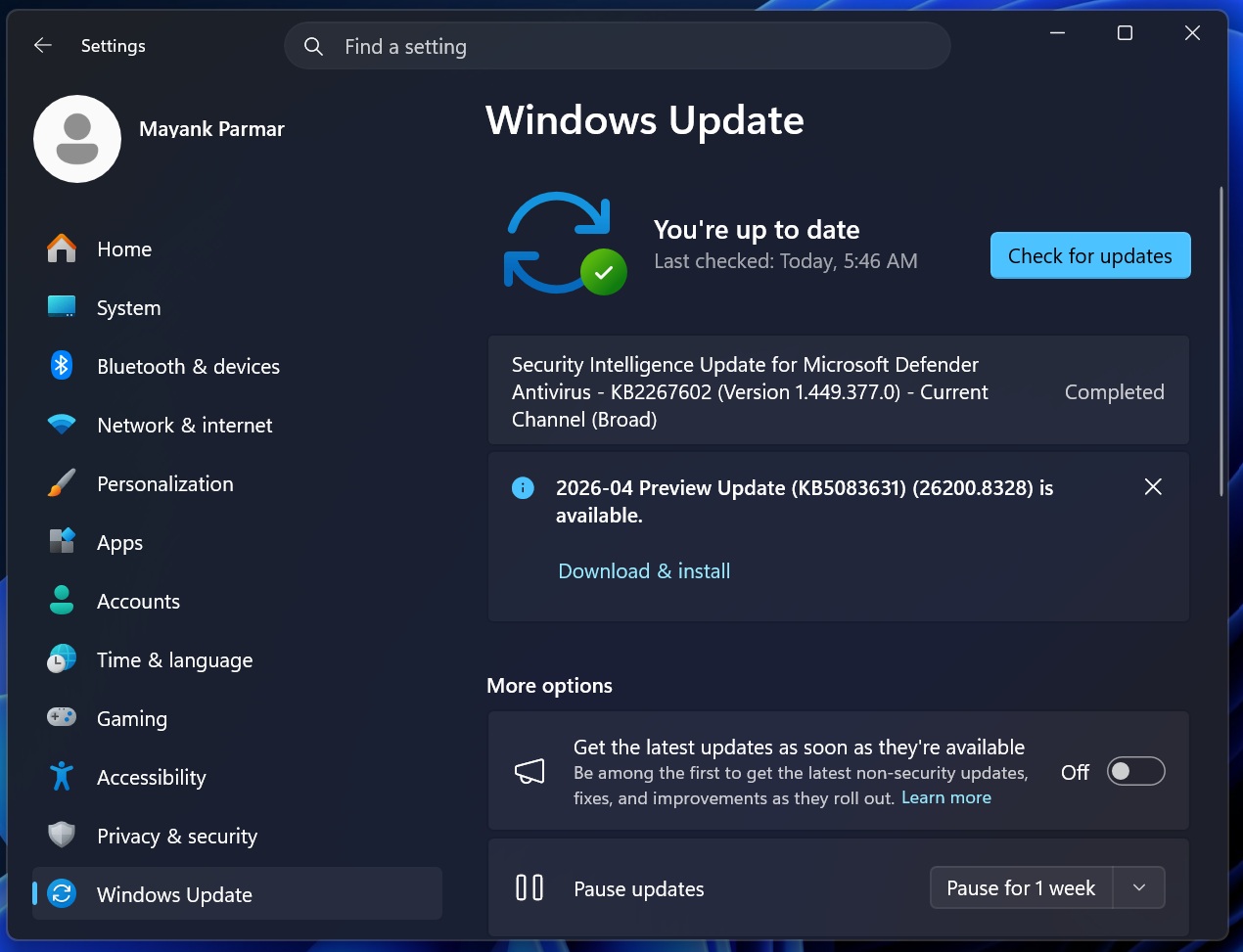
Windows 11 KB5083631 is a big release, but it’s marked as an optional update, which means it’s not downloaded automatically. Also, the update appears to include early bits from Microsoft’s Windows K2 efforts, which is the name of an internal project that aims to improve Windows 11.
Microsoft has plans to release up to 18 major improvements for Windows 11 in 2026, but those changes are not rolling out today. Instead, we’re getting some of the early bits, such as a more reliable File Explorer. At the same time, Microsoft is also rolling out agents to the taskbar, but the feature is completely optional.
Download Links for Windows 11 KB5083631
Windows 11 KB5083631 Direct Download Links: 64-bit and ARM-64 | You can use the linked Microsoft Update Catalog if you are having issues with Windows Update. In all other cases, I strongly recommend using Windows Update. It’s also because Windows updates have become so large lately when downloaded via Update Catalog:
Build NumberSizeOS VersionArchitecture26200.83285122.5 MBWindows 11 25H2x64-based26200.83285122.5 MBWindows 11 25H2arm64-based26100.83284605.7 MBWindows 11 24H2x64-based26100.83284605.7 MBWindows 11 24H2arm64-basedFor 64-bit systems, Windows 11 Build 26200.8328 is literally 5.1GB. On the other hand, the ARM version sits at 4.6GB. We have a full analysis that explains why Windows updates are growing in size, and it’s partly due to the fact that AI models are now bundled with these updates, even though they’re never applied to your PC.
What’s new in Windows 11 Build 26200.8328 (25H2) / Build 26100.8328 (24H2)?
All Windows updates roll out major changes gradually, which means you’ll not see the changes immediately.
1. Xbox mode is now rolling out
In our tests, Windows Latest found that Windows 11 KB5083631 enables the highly anticipated Xbox Game Mode on regular PCs. Until now, the Xbox Game, previously called Full Screen Experience (FSE), was locked to handheld devices. That changes today as part of Microsoft’s efforts to win back gamers.
What is Xbox mode in Windows 11?Xbox Mode has been available on handheld as ‘Full Screen Experience (FSE),’ and it transforms Windows into a console experience. Ahead of the PC rollout, Microsoft rebranded FSE as ‘Xbox mode,’ and it finally shows up after installing today’s optional update.
However, it’s not turned on by default for obvious reasons. If you’re on Build 26200.8328 / 26100.8328, you can enable Xbox Mode by following these steps:
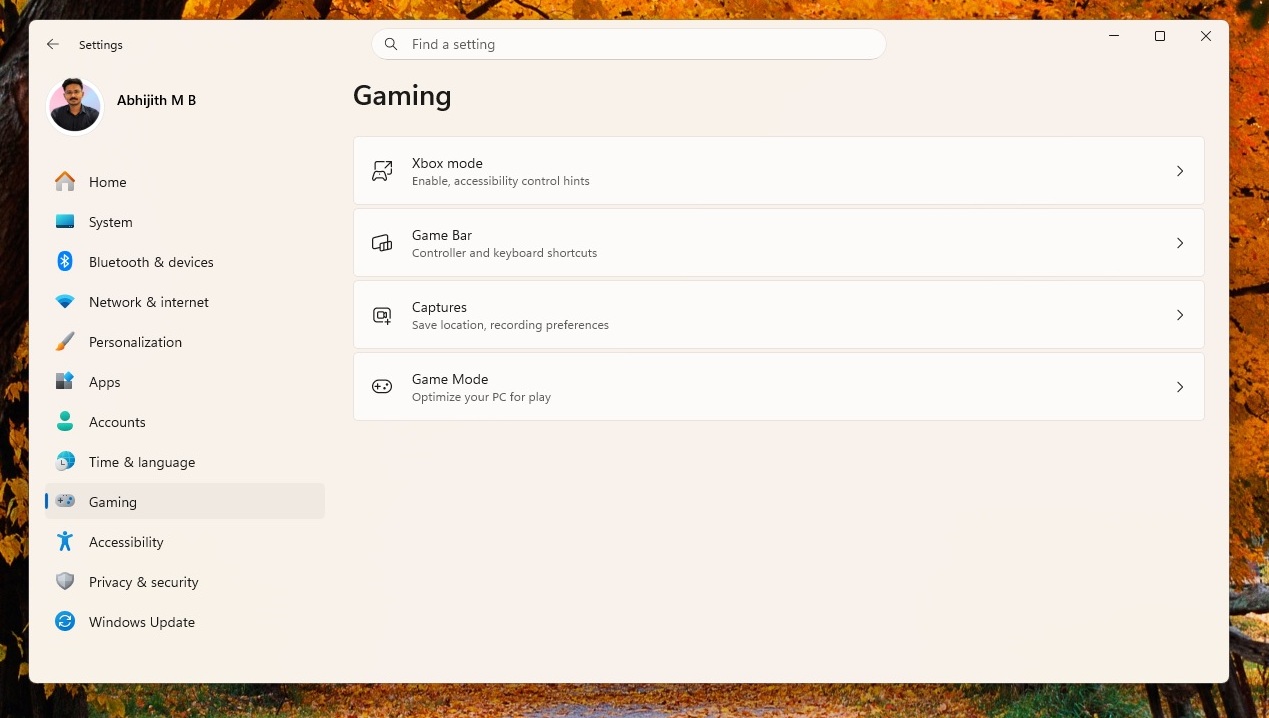
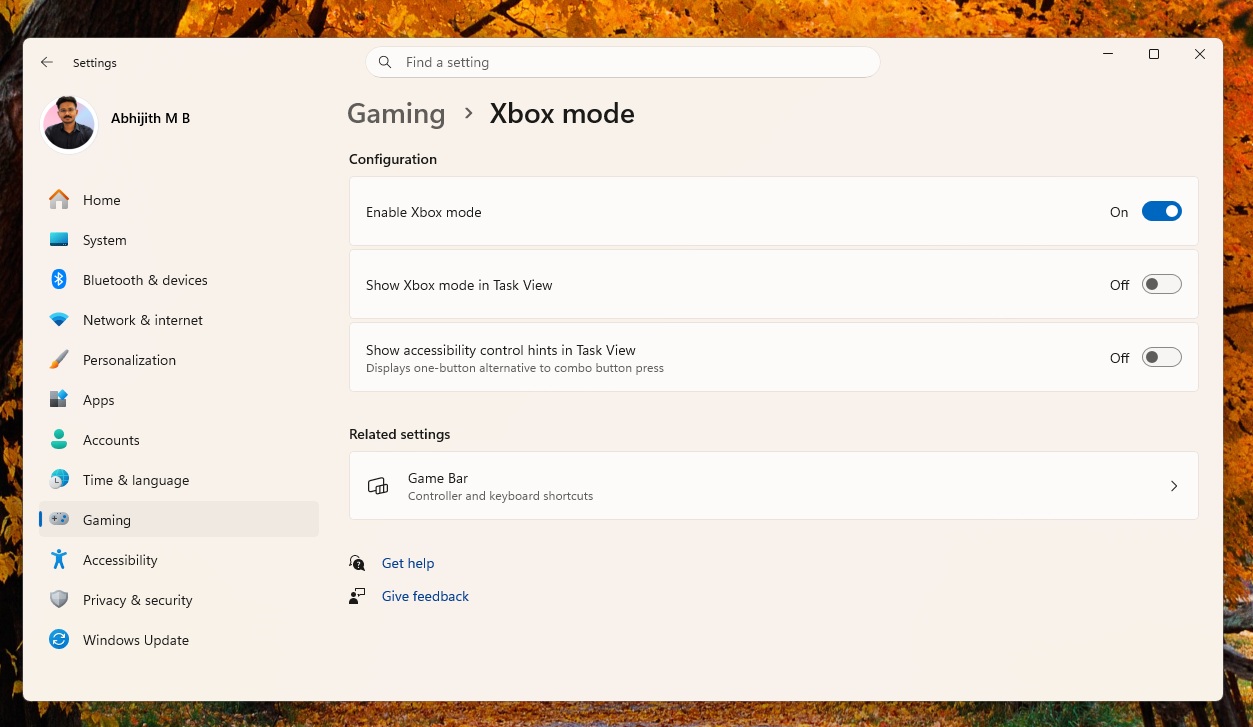
When you turn on the Xbox mode, it replaces the traditional Windows desktop workflow with an Xbox-first interface where you focus on gaming, and Microsoft takes care of the performance.
 Launching Xbox Mode in Windows PC
Xbox mode for Windows 11 turns on a full-screen gaming experience, and the new interface is optimized for controllers. That means you can use any gaming controller, including an Xbox One controller, to navigate the new Xbox home page on your Windows 11 PC.
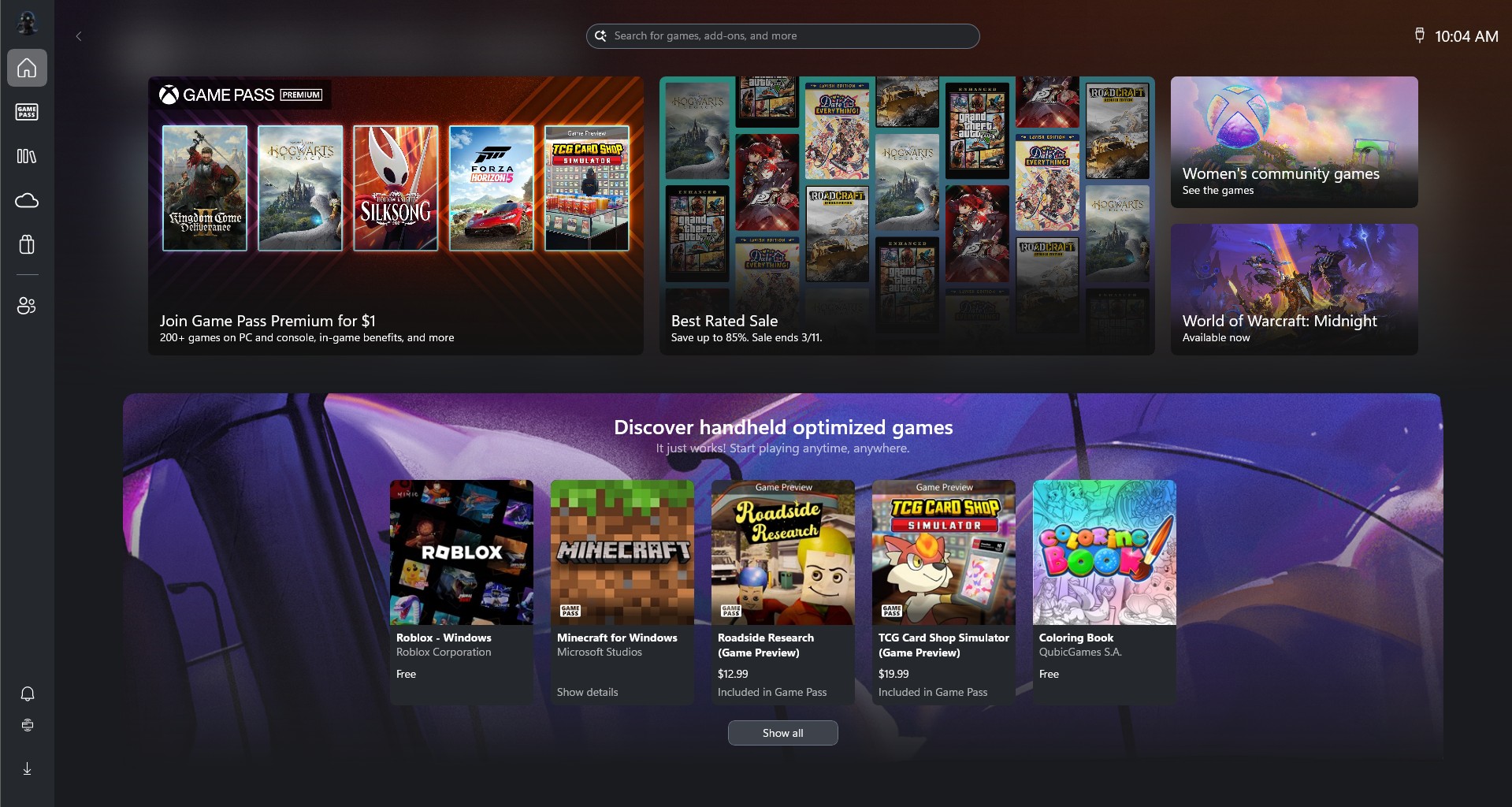 Xbox Mode interface in Windows 11 PC
On your new Xbox desktop (dashboard, not your Windows desktop), you can open any game, use Xbox Game Bar to enhance and monitor performance, and automatically switch between apps using your controller.
https://www.windowslatest.com/wp-content/uploads/2026/03/Switching-from-Xbox-Mode-to-Windows-Desktop-takes-just-a-second.mp4As somebody who has grown up using an Xbox console, I can confirm the experience is closer to using a console than a PC. Of course, there are some shortcomings, including performance.
Windows Latest understands that Xbox mode does allow games to run better, but it still does not address the underlying issues of Windows, including bugs that hurt game performance. It’s not close to the handheld experience, where Windows reduces background usage/tasks to free up resources for games.
Xbox mode is a great idea, but most of you won’t see it today. I was curious why I didn’t see it on my other PC, so I asked Microsoft, and it told me that the feature is rolling out with Windows 11 KB5083631. It’s a gradual rollout, and nobody can tell you when the feature will show up.
According to Microsoft, it’ll take anywhere between a day and a few weeks for Xbox mode to show up on all PCs. If you can’t wait, you can force-enable Xbox mode in Windows 11 using an open-source tool called ‘ViVeTool.’
2. File Explorer is now faster, consistent with folder views, and more
File Explorer has a problem where it does not correctly remember folder views across all folders. For example, if your Downloads folder view is set to “Extra large icons,” you’d expect the icons to appear in an extra-large layout, which is a fair expectation.
However, if you open the Downloads folder via another app, such as the Edge browser, the Downloads folder will not respect your preference and default to “Details” view.
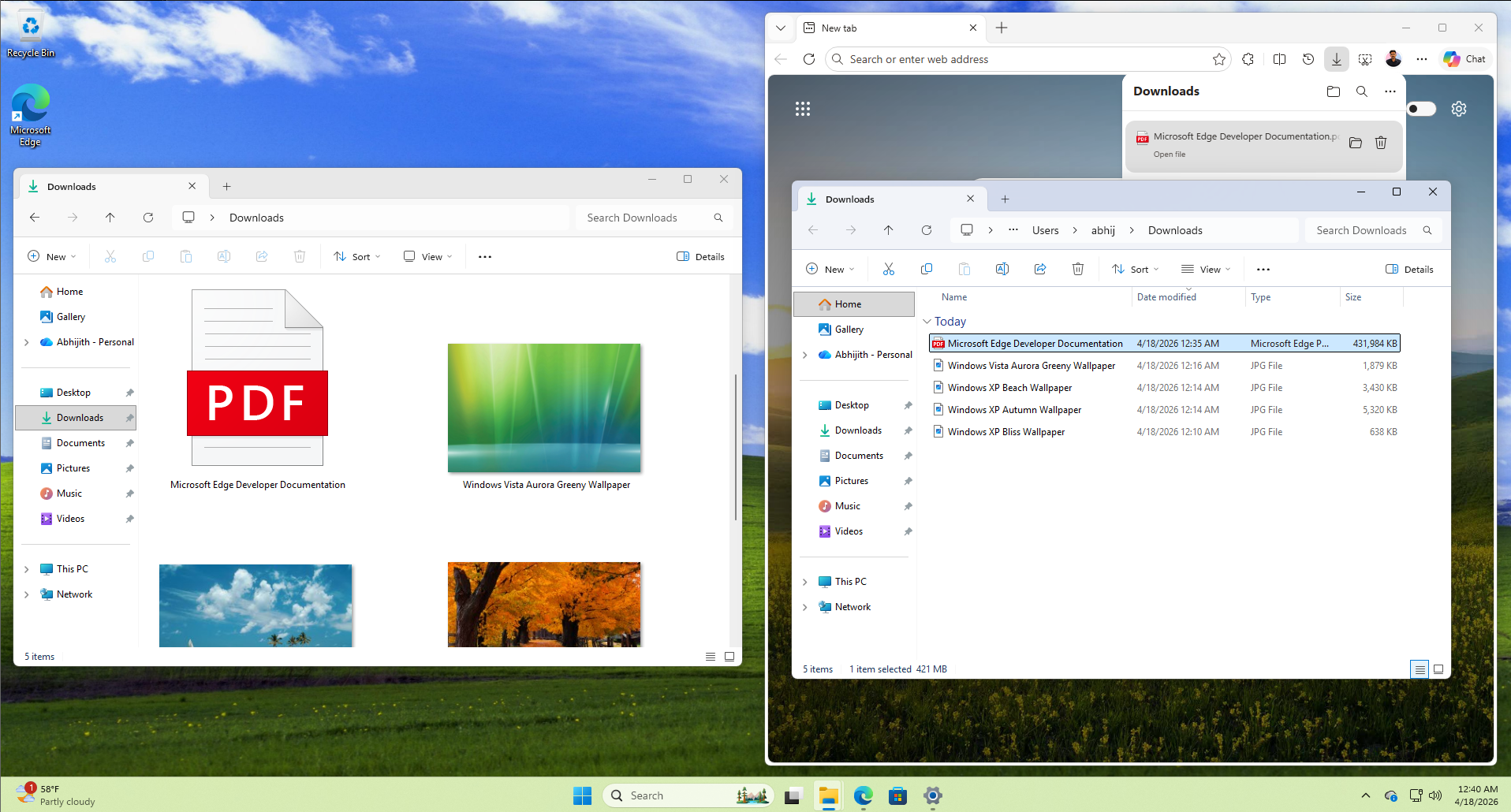 Downloads folder is set to View files and folders as Extra Large Icons, but opening from browser shows them as list
With Windows 11 KB5083631 (Build 26200.8313), Microsoft says it patched this behavior, which means folder view will be consistent in File Explorer.
Microsoft has also extended support for archive formats in File Explorer. If you right-click archives like nupkg, which is for NuGet Packages, you’ll be able to extract their content without any third-party apps. Other new formats include xar, uu, and cpio.
Moreover, it looks like you’ll no longer run into a white flash when File Explorer is set to ‘This PC’ and Windows is in dark mode. This bug has been affecting users for years now, and it’s finally getting fixed. It’s not the first time Microsoft has tried to fix the white flashes in dark mode bug, though. This time, it appears to have been fully fixed.
Last but not least, Microsoft says it improved the reliability of explorer.exe-related processes, so it doesn’t keep running when it’s not required.
3. Haptic feedback support
Windows 11 KB5083631 is testing a major update for the haptic feedback experience, where you’ll feel the feedback (mobile-alert-like vibration) when you perform certain window actions, such as resizing windows.
Right now, haptic is mostly limited to clicks/taps and certain games, but now it’ll expand to cover window actions. You’ll also feel haptic feedback when aligning objects in PowerPoint.
You can manage these new haptic features in Settings > Bluetooth & devices > Mouse or Touchpad > Haptic signals.
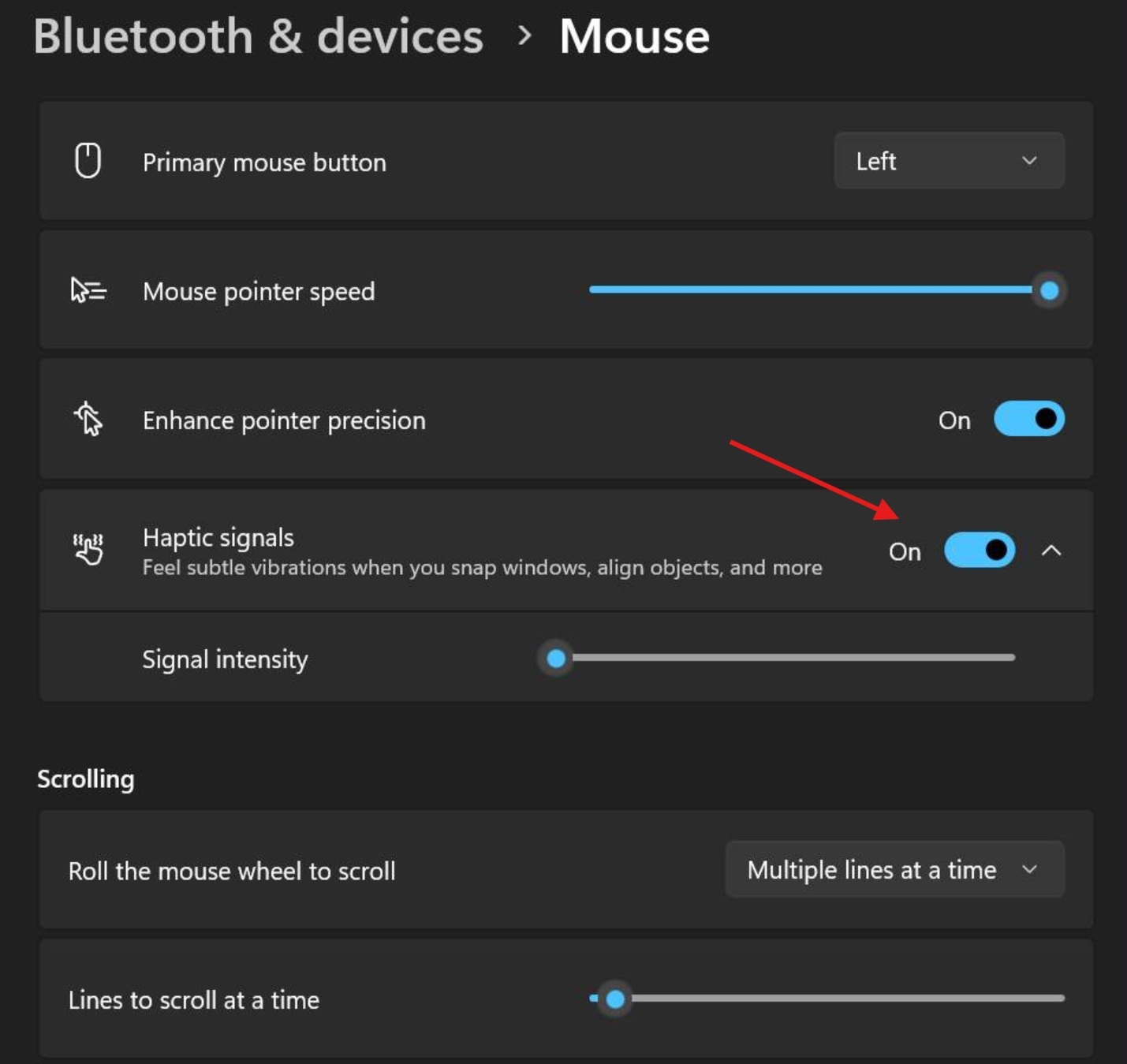
However, right now, it only works with certain mice and trackpads. Microsoft says support for more hardware will be rolled out in the coming months.
4. Taskbar is getting AI-powered agents, but the feature is optional
Microsoft is adding support for AI-powered agents to Windows 11’s taskbar, but the feature is entirely optional, and most users would not see agents on their taskbar unless they specifically use the feature.
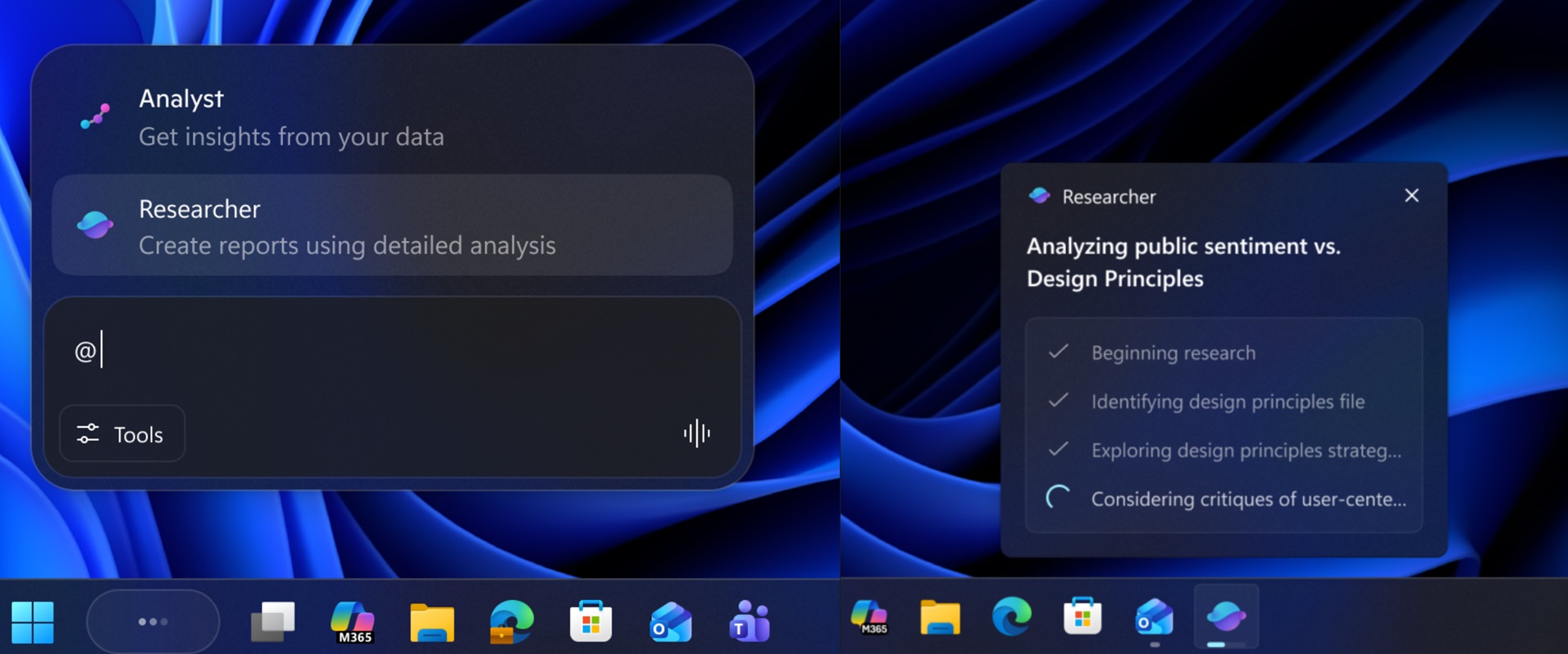
Microsoft says third-party apps need to use the Windows UI Shell Tasks API to integrate taskbar agent support. Right now, only Microsoft 365 Researcher supports an agentic taskbar, and when you perform research in the app, you’ll be able to control and monitor the AI flow directly from the taskbar.
5. Drag Tray is now called Drop Tray, and it’s no longer annoying
Drag Tray is now called Drop Tray, and it’s less annoying than before. For those unaware, Drop Tray (previously Drag Tray) is a file-sharing feature that appears when you hold a file in File Explorer and drag it to the top region. While it’s a neat idea, the catch is that the feature often disrupts regular drag-and-drop behavior.
https://www.windowslatest.com/wp-content/uploads/2026/04/Drop-Tray-is-much-smaller-than-before.mp4Microsoft says Drop Tray in Windows 11 KB5083631 now uses a smaller peek view, which does not mean it’ll no longer get in the way when you’re normally dragging and dropping files to organize your desktop.
6. Reliability
One of the most notable changes in today’s update for Windows 11 is reliability, and it’s part of the company’s plans to revive the operating system. In our tests, Windows Latest observed that Windows 11 KB5083631 allows startup apps to open faster, and explorer.exe will no longer misbehave when you sign in or interact with the taskbar.
For example, the system tray area of the taskbar is more reliable and should load faster. Second, Windows Hello now recognizes your face better, and fingerprints are no longer lost when you upgrade Windows.
Here’s the list of other improvements rolling out in Windows 11 KB5083631:
- Microsoft says voice typing on the touch keyboard has been updated, and it now looks simpler.
- Microsoft has improved the mouse wheel-related settings, so they’re now more reliable.
- Microsoft Store no longer fails to download apps or games due to errors like 0x80070057, 0x80240008, and 0x80073d28.
- Storage Settings is now faster.
- FAT32 now supports 1TB.
Microsoft is not aware of any major issues with today’s optional update, so you can safely download it today. Also, if you skip today’s optional update, you’ll automatically all these changes with May 2026 Patch Tuesday, which is scheduled for May 12, 2026.